The right phone for every desk, configured before it arrives.
Avaya J100 Series IP phones deliver HD audio, color displays and one-touch call handling. We match each model to the role at that desk, pre-program it, and connect it to Intuity Secure SIP so every call is encrypted from the handset out.
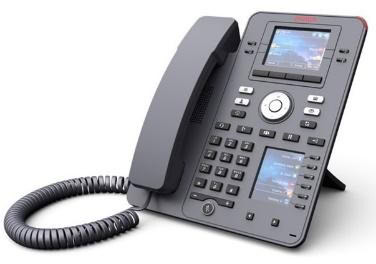
Two color displays in a compact body. The second screen keeps extra lines, speed dials and team members in view without adding a module.
Main display
2.8" color
Second display
Color, built in
Programmable keys
Up to 96, paged
USB
Yes
Expansion modules
Not needed
Best for: clinicians, managers and staff who watch several lines from a small desk.
Most popular · everyday workhorse
Avaya J179
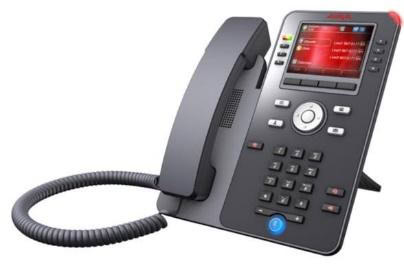
A large color screen and eight dual-LED line keys for staff who answer, hold and transfer calls all day. Add button modules as a desk grows into a front desk.
Main display
3.5" color
Line keys
8 dual-LED
Call appearances
24, across 3 pages
Headsets
Wired; Bluetooth optional
Expansion modules
Up to 3
Best for: general staff, schedulers and anyone handling steady call volume.
Executive · attendant
Avaya J189
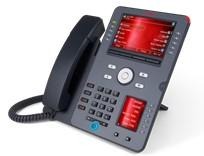
The flagship. A 5-inch high-resolution main screen plus a second color display, super-wideband speakerphone and USB-A and USB-C ports for modern headsets.
Main display
5" color, 800 × 480
Second display
Color, built in
Line keys
10 dual-LED + 6 on second screen
USB
USB-A and USB-C
Expansion modules
Up to 2
Best for: physicians, executives and attendants who run many lines at once.
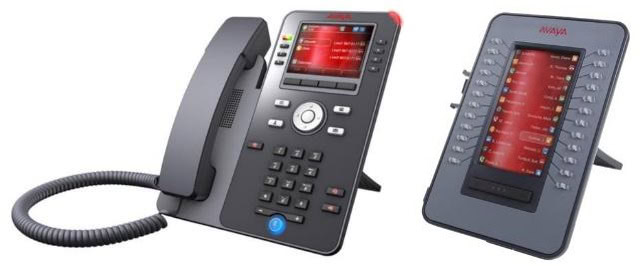
The Avaya J100 Expansion Module (JEM24) attaches to the side of a J179 or J189 and turns it into a front-desk console. Each key lights to show whether a colleague is idle, ringing or on a call, so your receptionist transfers with one touch instead of guessing.
24
dual-color LED keys per page
4.3"
color display with name labels
Up to 3
modules on a J179, 2 on a J189
Monitor extensions, park slots and hunt groups at a glance
One-touch transfer, intercom and speed dial
Names update automatically when staff change, with no paper labels
Powered by the phone, so there’s no extra power supply
Included with every phone
Delivered ready to work.
Pre-programmed
Names, extensions, line keys and BLF set up by our engineers before delivery.
Encrypted calling
Runs on Intuity Secure SIP with TLS/SRTP and AI-driven threat detection.
Built for Avaya
Native to Avaya IP Office, Server Edition and Aura, backed by more than 20 years as an Avaya dealer.
Trained and supported
Staff training at go-live and US-based support for every handset afterward.
Switch without downtime
The reason organizations stay on aging phone systems is fear of the cutover. Here is how we remove it.
Network
Assessment
We map your current lines, numbers, and call flows.
Migration Plan
You get a written plan with dates, owners, and a rollback path.
Parallel Testing
The new system runs alongside your old one until it proves itself.
Go Live
Numbers port on schedule. Your callers notice nothing.
24/7 Support
US-based engineers monitor and answer from day one.
Most front desks run a J179 with one or more JEM24 expansion modules. The J179 takes up to three, so a receptionist can see who is free and transfer with one touch.
Will the J100 Series work with our current Avaya system?
The J100 Series is native to Avaya IP Office, Server Edition and Aura. Tell us which platform you run and we will confirm the fit before you order.
Do the phones arrive ready to use?
Yes. Our engineers set up names, extensions, line keys and busy lamp field before delivery, and we train your staff at go-live.
Can the phones use Wi-Fi or Bluetooth?
Yes, with an optional module on each model. Every J100 phone also has dual Gigabit Ethernet and Power over Ethernet.
Not sure which phone fits?
Tell us who sits at each desk. We’ll map the phones.
We respond within 1 Business Day
● We respond within 1 Business Day
Request Your Custom Quote
Tell us about your setup and we will build a plan around it.
We never sell your information. See our Privacy Policy.
Why organizations choose Intuity
Encrypted calling with TLS and SRTP, on by default